
2.5 KiB
2.5 KiB
- Bug in the planning when it repeats yearly: It is taking the exact same dates, but the way you usually take time off is week based, so 5th-11th of october 2026 is a monday through sunday, but for 2027 it looks like I'll take time off from tuesday to the following week's monday, which is not what I will do. Instead for 2027 I will probably take 4th to 10th instead.
- Please just verify that if I say that I take a full week time-off, including saturday and sunday, that I will NOT actually take any vacation or PL during those days. Or rather: This should be a setting: Take PL during red days yes/no. And it should default to NO. It is impossible to take vacation during red days (and saturdays), but you can actually take PL to get more money, but you will of course loose days.
- The calendar view can still get messed up, see this image:
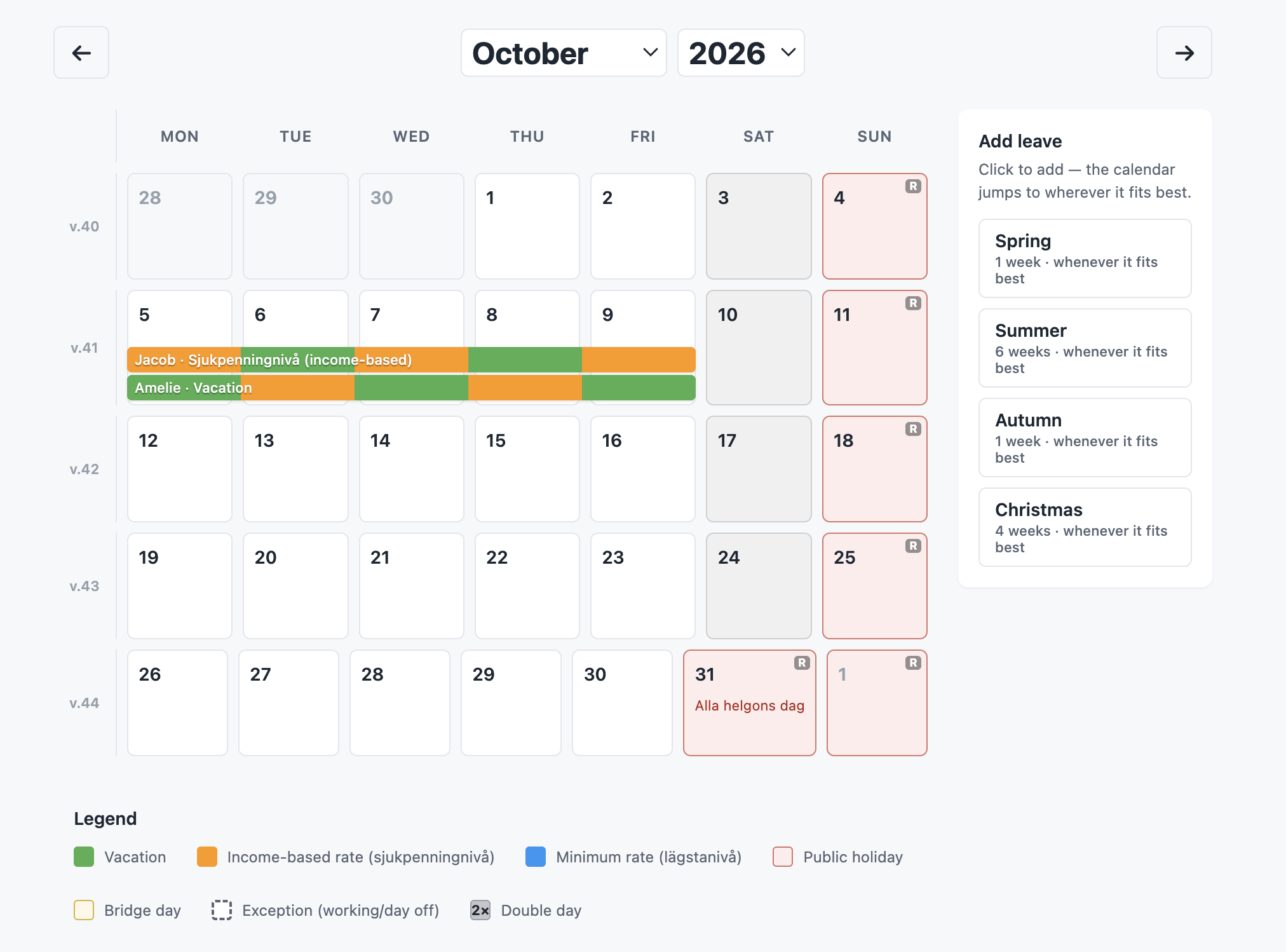 . All boxes should be the same size in the calendar. It is a calendar view after all. This happens when the text takes too much space. Never allow the boxes to change size.
 - When using the preset buttons in the calendar view, we are on the right track here, but I see some issues:
- The default when there's two parents is that it is set to "either parent", which should default to "both parents" because we want to be off together.
- The alternating between PL and vacation is very annoying: It doesn't give us any benefits, just lost more admin when requesting the leave. Instead it is better to so as long chunks of each as possible. Probably something like "Parent 1 takes 3 weeks PL while parent 2 takes 3 weeks of vacation, then they switch". But this doesn't mean that we shouldn't consider all the original tips and tricks how to maximise money.
- There should be a "Today" button left of the month dropdown in the calendar view that jumps to today's month.
- Please turn off the debug mode that the FK scraping is shown, there's a feature flag for this.
- Create a how-it-works.md file explaining what the "Your profile" part of the settings is for and what the salary type and employment status plays for role when it comes to optimising the time off. How is it used.
- The "Public holidays" section in the settings, that's great! But to the right where it says "off", let's make that dynamic so I can click it and it flips (only that day that I click, not the same day the following year) to be a working day.
- When clicking the remove button on an event in the calendar view, there should be a difference of "removing just this event" and "removing all of the events related to this period in time".
